

Claude Code GitHub Actions Usage Tutorial
Claude Code GitHub Actions is the GitHub Actions integration solution officially launched by Anthropic. After installation, simply @claude in an Issue, PR, or comment, and Claude will read code, modify code, submit PRs, and run reviews directly in your repository as a GitHub Bot.
This document explains how to connect Claude Code GitHub Actions to Claude models like claude-opus-4-8 through the proxy service of 胖狐中转, without the need for an official Anthropic subscription. All screenshots in this document are from our public demo repository acedatacloud-dev/claude-code-action-demo, which can be forked for reproduction.
¶ Application Process
To use Claude Code, first visit the 胖狐中转 Console to obtain your API Token for backup.

If you are not logged in or registered, you will be automatically redirected to the login page to invite you to register and log in. After logging in or registering, you will be automatically returned to the current page.
There will be a free quota granted upon your first application, allowing you to experience Claude Code services for free.
¶ Configure GitHub Secret
Add the copied Token to the Secrets of the target repository, naming it ANTHROPIC_AUTH_TOKEN:
- Go to the repository Settings → Secrets and variables → Actions
- Click New repository secret
- Fill in Name as
ANTHROPIC_AUTH_TOKEN, and paste the Token in Secret - Click Add secret
The 胖狐中转 gateway uses
Authorization: Bearer <token>for authentication, butanthropics/claude-code-actioninternally rewrites the request tox-api-keyusing the Anthropic SDK. The Workflow below will start a local HTTP proxy on a GitHub Runner that translatesx-api-keyback toAuthorization: Bearer.
¶ Add Workflow File
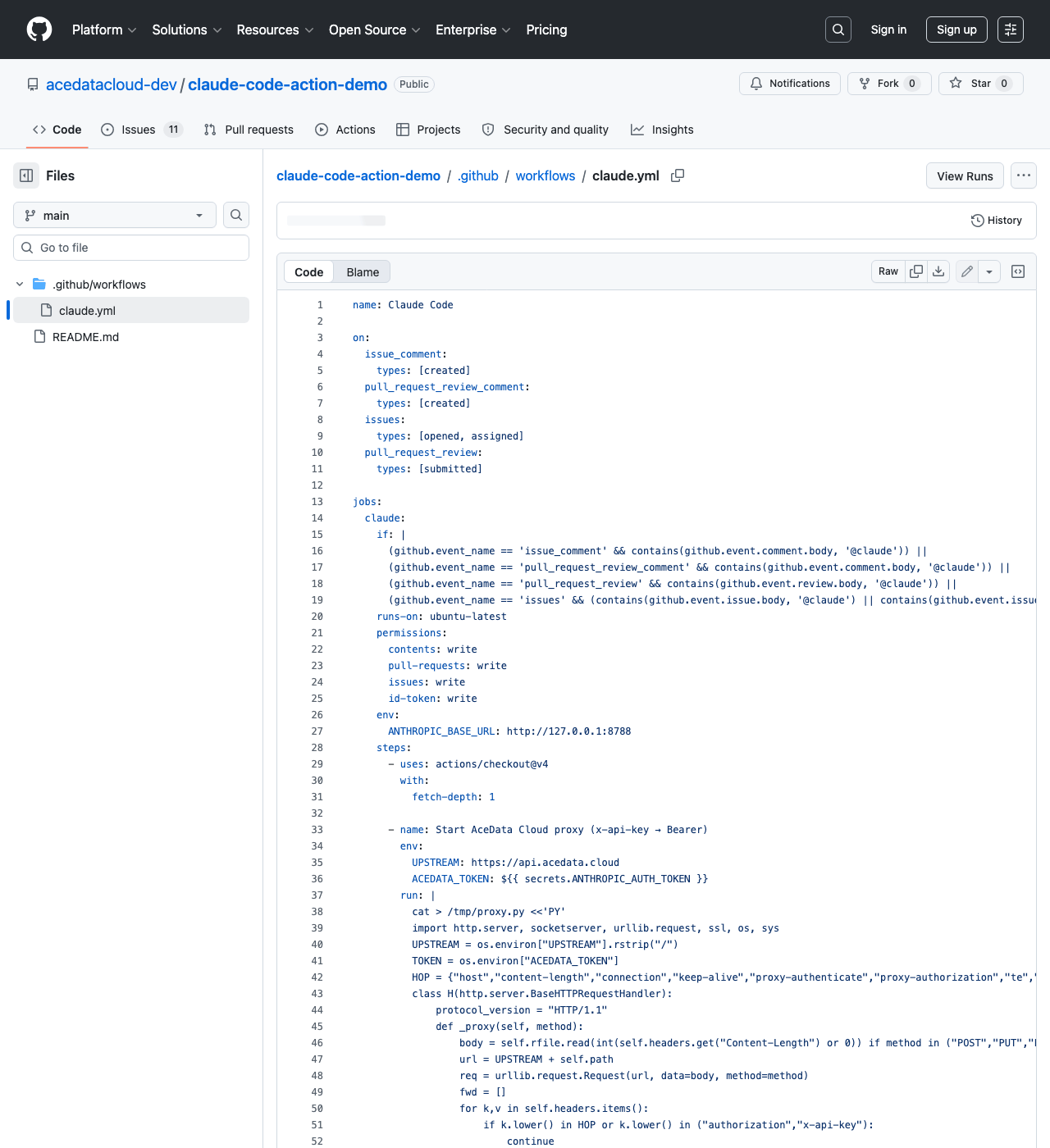
Create .github/workflows/claude.yml in the repository, the complete content is as follows (this is the version that successfully ran in our demo repository):
name: Claude Code

on:
  issue_comment:
    types: [created]
  pull_request_review_comment:
    types: [created]
  issues:
    types: [opened, assigned]
  pull_request_review:
    types: [submitted]

jobs:
  claude:
    if: |
      (github.event_name == 'issue_comment' && contains(github.event.comment.body, '@claude')) ||
      (github.event_name == 'pull_request_review_comment' && contains(github.event.comment.body, '@claude')) ||
      (github.event_name == 'pull_request_review' && contains(github.event.review.body, '@claude')) ||
      (github.event_name == 'issues' && (contains(github.event.issue.body, '@claude') || contains(github.event.issue.title, '@claude')))
    runs-on: ubuntu-latest
    permissions:
      contents: write
      pull-requests: write
      issues: write
      id-token: write
    env:
      ANTHROPIC_BASE_URL: http://127.0.0.1:8788
      CLAUDE_CODE_AUTO_COMPACT_WINDOW: '850000'
    steps:
      - uses: actions/checkout@v4
        with:
          fetch-depth: 1

      - name: Start AceData Cloud proxy (x-api-key → Bearer)
        env:
          UPSTREAM: https://api.ace.324567.xyz
          ACEDATA_TOKEN: ${{ secrets.ANTHROPIC_AUTH_TOKEN }}
        run: |
          cat > /tmp/proxy.py <<'PY'
          import http.server, socketserver, urllib.request, urllib.error, os
          UPSTREAM = os.environ["UPSTREAM"].rstrip("/")
          TOKEN = os.environ["ACEDATA_TOKEN"]
          HOP = {"host", "content-length", "connection", "keep-alive",
                 "proxy-authenticate", "proxy-authorization", "te",
                 "trailers", "transfer-encoding", "upgrade"}

          class H(http.server.BaseHTTPRequestHandler):
              protocol_version = "HTTP/1.1"

              def _proxy(self, method):
                  body = self.rfile.read(int(self.headers.get("Content-Length") or 0)) \
                      if method in ("POST", "PUT", "PATCH") else None
                  req = urllib.request.Request(UPSTREAM + self.path, data=body, method=method)
                  for k, v in self.headers.items():
                      if k.lower() in HOP or k.lower() in ("authorization", "x-api-key"):
                          continue
                      req.add_header(k, v)
                  req.add_header("Authorization", f"Bearer {TOKEN}")
                  try:
                      resp = urllib.request.urlopen(req, timeout=600)
                      data, code, headers = resp.read(), resp.status, resp.headers
                  except urllib.error.HTTPError as e:
                      data, code, headers = e.read(), e.code, e.headers
                  self.send_response(code)
                  for k, v in headers.items():
                      if k.lower() in HOP:
                          continue
                      self.send_header(k, v)
                  self.send_header("Content-Length", str(len(data)))
                  self.end_headers()
                  self.wfile.write(data)

              def do_GET(self): self._proxy("GET")
              def do_POST(self): self._proxy("POST")
              def do_PUT(self): self._proxy("PUT")
              def do_DELETE(self): self._proxy("DELETE")
              def log_message(self, *a, **k): pass

          class T(socketserver.ThreadingMixIn, http.server.HTTPServer):
              daemon_threads = True
              allow_reuse_address = True

          T(("127.0.0.1", 8788), H).serve_forever()
          PY
          nohup python3 /tmp/proxy.py > /tmp/proxy.log 2>&1 &
          for i in $(seq 1 20); do
            curl -sS -o /dev/null http://127.0.0.1:8788/ && break
            sleep 0.3
          done

      - name: Run Claude Code via AceData Cloud
        uses: anthropics/claude-code-action@v1
        with:
          anthropic_api_key: dummy-not-used
          github_token: ${{ secrets.GITHUB_TOKEN }}
          claude_args: |
            --model claude-opus-4-8
          show_full_output: 'true'
After submission, you will see this Claude Code workflow in the Workflows list of GitHub Actions:
¶ Key Points
ANTHROPIC_BASE_URL: http://127.0.0.1:8788directs all Anthropic API requests to the local proxy.CLAUDE_CODE_AUTO_COMPACT_WINDOW: '850000'sets the automatic compression trigger window to approximately 850,000 tokens, reserving space for tool results and final answers; it does not modify the model's context limit. Keep the quotes here to ensure YAML treats the value as a string for the environment variable.- The proxy script reads the Secret
ANTHROPIC_AUTH_TOKEN, discards thex-api-keyheader in upstream requests, and uniformly replaces it withAuthorization: Bearer <token>before forwarding tohttps://api.ace.324567.xyz. anthropic_api_key: dummy-not-usedmust be filled with a non-empty string; otherwise, the validation before startingclaude-code-actionwill fail directly. The actual authentication uses theANTHROPIC_AUTH_TOKENin the Secret.--model claude-opus-4-8specifies the use of Claude Opus 4.8, which can be replaced with any Claude model supported by 胖狐中转, such asclaude-sonnet-4-5,claude-haiku-4-5.
¶ Trigger Claude
Create a new Issue and write @claude followed by what you want it to do in the body. For example, in the image below, the title is Smoke test #11 (Opus 4.8), and the body is @claude Reply with: OK.:
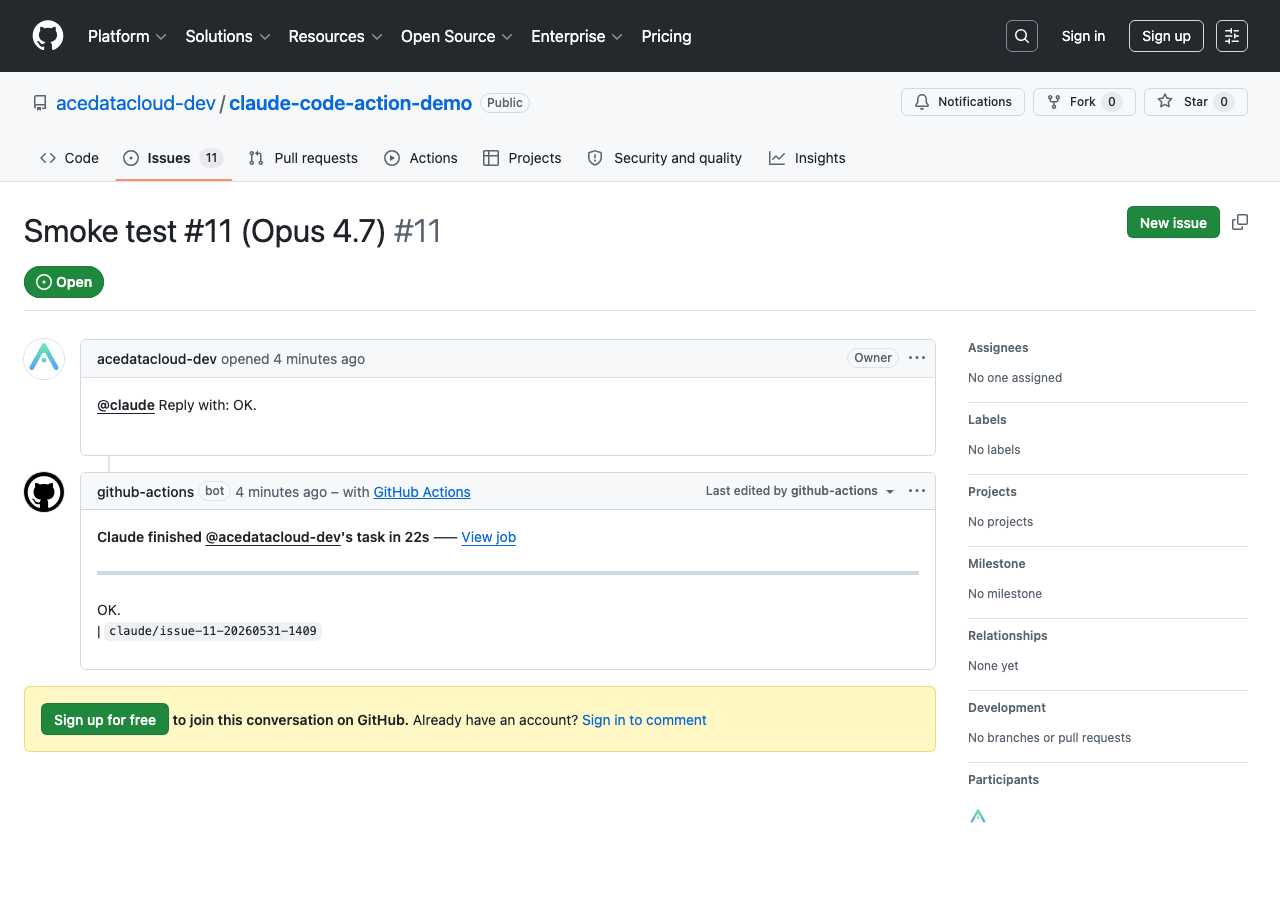
About 30 seconds later, the github-actions Bot will reply to the comment with the output of Claude Opus 4.8:
Claude finished @acedatacloud-dev's task in 22s — View job
OK.
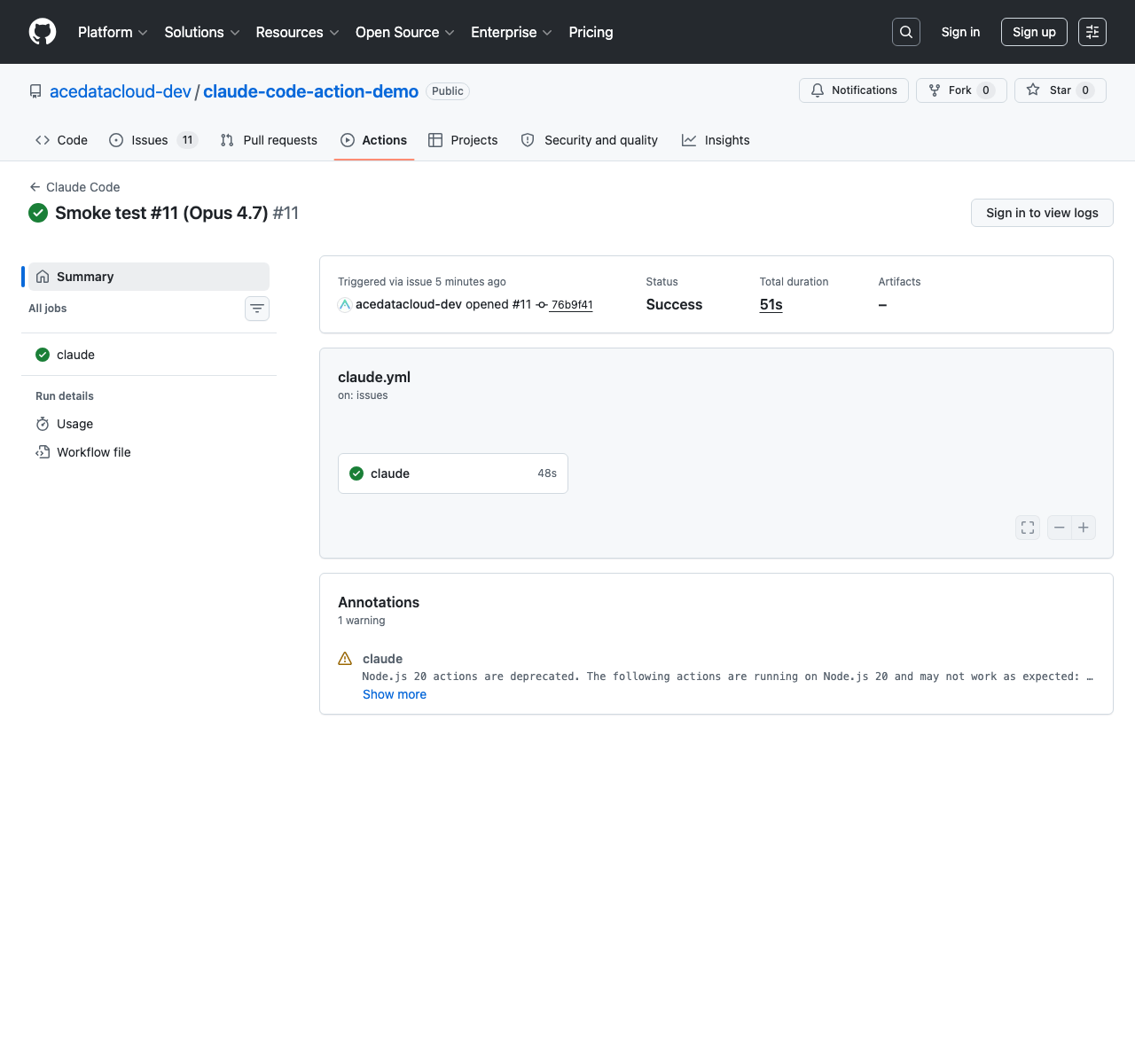
The corresponding Workflow run result is Success, with a total duration of 51 seconds:
¶ How It Works
GitHub Issue / PR comment contains @claude
  └─→ GitHub Actions triggers .github/workflows/claude.yml
        ├─ Step 1: Start local proxy 127.0.0.1:8788
        └─ Step 2: anthropics/claude-code-action@v1
              └─→ Claude Code CLI uses ANTHROPIC_BASE_URL as Anthropic API
                    └─→ Request lands on local proxy (with x-api-key=dummy-not-used)
                          └─→ Proxy replaces with Authorization: Bearer <ANTHROPIC_AUTH_TOKEN>
                                └─→ Forwards to https://api.ace.324567.xyz
                                      └─→ Claude Opus 4.8 performs actual inference
              └─→ Claude reads code / writes code / comments / submits PR in the repository
The only key transformation in the entire chain occurs at the local proxy step. The 胖狐中转 gateway only recognizes the Authorization: Bearer <token> authentication header, but the official claude-code-action internally uses the Anthropic SDK, which enforces requests to be initiated with the x-api-key header. This Python HTTP proxy, which is less than 40 lines, is used to bridge the two authentication conventions, all running in the memory of the GitHub Runner, with the Token not leaving the Runner.
¶ Switching Models
You can switch using claude_args:
      - name: Run Claude Code via AceData Cloud
        uses: anthropics/claude-code-action@v1
        with:
          anthropic_api_key: dummy-not-used
          github_token: ${{ secrets.GITHUB_TOKEN }}
          claude_args: |
            --model claude-sonnet-4-5
            --max-turns 8
          show_full_output: 'true'
| Parameter | Description |
|---|---|
--model |
Model name, commonly claude-opus-4-8, claude-sonnet-4-5, claude-haiku-4-5 |
--max-turns |
Maximum dialogue turns per task, default is 10 |
--allowed-tools |
Restrict available tools, separated by commas |
--mcp-config |
Additional MCP configuration file path |
A list of available models can be found on the Claude Messages service page.
¶ Frequently Asked Questions
¶ 1. Workflow startup fails, prompting Either anthropic_api_key or claude_code_oauth_token must be provided
Before starting claude-code-action@v1, at least one non-empty value must be provided among anthropic_api_key, claude_code_oauth_token, or the workload union of the three. Even if we will use Bearer Token authentication later, anthropic_api_key must be given a placeholder string (like dummy-not-used in the example).
¶ 2. Proxy returns 401, and CLS shows Authorization: Bearer -
This is usually due to an error in Secret settings. Strongly avoid using gh secret set ANTHROPIC_AUTH_TOKEN --body - which reads from stdin — if stdin is not set up correctly, the Secret will literally be set to -. Recommended method:
gh secret set ANTHROPIC_AUTH_TOKEN --repo <org>/<repo> --body '<your-real-token>'
After setting, you can temporarily add a line in the Workflow echo "len=${#ACEDATA_TOKEN}" to print the length (without leaking the original value) to verify if the Secret is effective.
¶ 3. Claude does not respond to @claude
- Confirm that the
if:condition covers the triggering event, such as comments triggering correspondingissue_comment/pull_request_review_comment. - Confirm that there is a
.github/workflows/claude.ymlin the repository and that Actions are not disabled. - Go to the Actions tab and confirm that you can see the corresponding workflow Run.
- Check if the proxy Step started successfully; you can refer to the implementation of the
Proxy log (on failure)Step in the demo repository to print out/tmp/proxy.logto locate the issue.
¶ 4. How to check remaining quota
Log in to the 胖狐中转 console to view the current account's remaining quota.
The console - usage history shows the detailed billing for each call.
¶ Learn More
- 🧪 acedatacloud-dev/claude-code-action-demo — The demo repository used in this article, which can be directly forked and reproduced
- 📖 Claude Code GitHub Actions Official Documentation
- 🛠️ anthropics/claude-code-action — Action source code
- 🔧 胖狐中转 Claude Messages Service